Simpler JVM Project Setup with Mill 1.1.0
Li Haoyi, 27 Jan 2026
Java and other JVM languages like Scala or Kotlin are often used for large enterprise codebases,
but the friction of configuring their tooling means they are less often used for small
programs or scripts. The new release of the Mill build tool v1.1.0
(changelog)
contains two features that try to improve upon this pain point, allowing your projects
to be configured via a compact build.mill.yaml file, rather than a verbose pom.xml:
build.mill.yamlextends: JavaModule
mvnDeps:
- org.jsoup:jsoup:1.7.2
- org.slf4j:slf4j-nop:2.0.7And letting single-file programs be configured by a //| build header comment
at the top of the file:
HtmlScraper.java//| mvnDeps:
//| - org.jsoup:jsoup:1.7.2
import org.jsoup.Jsoup;
public class HtmlScraper {
...
}> ./mill HtmlScraper.java Singapore 1
Hokkien
Conscription_in_Singapore
Malaysia_Agreement
Government_of_Singapore
...This blog post will dive into these two new features: how they work, why they are interesting, and where they learn from or improve upon existing tools in the JVM ecosystem. We hope these features will streamline the process of setting up a project in Java, Scala, and Kotlin, making the JVM languages an attractive and easy way to write small-scale programs and scripts.
The Challenge of Small Java Programs
To understand the pain points of running small Java programs, consider a developer that has written a single-file Java program they want to run:
HtmlScraper.javaimport org.jsoup.Jsoup;
import java.util.*;
public class HtmlScraper {
static List<String> fetchLinks(String title) throws Exception {
var url = "https://en.wikipedia.org/wiki/" + title;
var doc = Jsoup.connect(url).header("User-Agent", "My Scraper").get();
var links = new ArrayList<String>();
for (var a : doc.select("main p a")) {
var href = a.attr("href");
if (href.startsWith("/wiki/")) links.add(href.substring(6));
}
return links;
}
public static void main(String[] args) throws Exception {
if (args.length < 2) throw new Exception("HtmlScraper.java <start> <depth>");
var seen = new HashSet<>(Set.of(args[0]));
var current = new HashSet<>(Set.of(args[0]));
for (int i = 0; i < Integer.parseInt(args[1]); i++) {
var next = new HashSet<String>();
for (String article : current) {
for (String link : fetchLinks(article)) {
if (seen.add(link)) next.add(link);
}
}
current = next;
}
for (String s : seen) System.out.println(s);
}
}This is a simple program that uses the Jsoup library to scrape the links off of a Wikipedia article’s HTML page, which it then uses to perform a breadth-first traversal across the Wikipedia article graph. While a bit contrived, this code is representative of many of the small programs that may be written in practice:
-
A student project
-
A one-off prototype
-
A small command-line script
In all these cases, the program would have a small amount of code and a few third-party dependencies. But with traditional build tools like Maven, running such code can be surprisingly involved:
-
Installing Java and Maven, which has a surprising number of intricacies
-
Writing out the
pom.xml(can you write the POM for the above program without copy-paste cargo-culting from StackOverflow/Google/ChatGPT?)pom.xml<project xmlns="http://maven.apache.org/POM/4.0.0" xmlns:xsi="http://www.w3.org/2001/XMLSchema-instance"> <modelVersion>4.0.0</modelVersion> <groupId>example</groupId> <artifactId>html-scraper</artifactId> <version>1.0</version> <dependencies> <dependency> <groupId>org.jsoup</groupId> <artifactId>jsoup</artifactId> <version>1.17.2</version> </dependency> </dependencies> <build> <plugins> <plugin> <groupId>org.codehaus.mojo</groupId> <artifactId>exec-maven-plugin</artifactId> <version>3.2.0</version> <configuration> <mainClass>HtmlScraper</mainClass> </configuration> </plugin> </plugins> </build> </project> -
Running the program using Maven (can you remember the command-line invocation without looking it up?)
> mvn exec:java -Dexec.args="Singapore 1" Hokkien Conscription_in_Singapore Malaysia_Agreement Government_of_Singapore ...This gets even more fiddly when you need to select a submodule in a larger project with
-pland use-amto ensure the upstream modules get compiled
None of these are blockers: after all we’ve been building and running Java programs for decades! But for someone trying to write a small program that can build and run reliably on their laptop, their colleagues' laptops, their CI machines and their production cluster, these things can end up being surprisingly tricky. Even modern AI assistants have limited context windows, which you don’t want to waste fumbling with version incompatibilities, or digging through XML boilerplate!
In theory Java and the JVM is a great platform to write and run small programs: easy to learn, widely used, and a broad ecosystem of high-quality builtin and third-party libraries. But in practice, this build-tool-setup friction means that people prefer to write their small programs in Bash, Python, or Node.js rather than writing them in Java, Scala or Kotlin.
Declarative Mill Builds
The first step Mill 1.1.0 takes towards solving the friction of running small JVM programs is
a new declarative configuration format. That lets us turn the verbose pom.xml above into
the declarative build.mill.yaml file below:
build.mill.yamlextends: JavaModule
mvnDeps:
- org.jsoup:jsoup:1.7.2Which you can run via
> ./mill run <arg1> <arg2>Compared to the equivalent Maven pom.xml or build.gradle, Mill’s build.mill.yaml files are
really lightweight, without Maven’s reams of XML boilerplate or Gradle’s complex Groovy/Kotlin
syntax. Even compared to Mill’s existing
programmable config syntax, it’s new
build.mill.yaml files contain far less boilerplate and complexity.
build.mill.yaml files are written in YAML 1.2, parsed
using the SnakeYaml-Engine library. This helps
mitigate many of the issues
that YAML has traditionally faced, with YAML 1.2 resolving issues such as the famous
Norway Problem and careful
de-serialization avoiding the mangling of version numbers such as 1.10. We expect
it will be relatively rare for users to hit YAML-related issues in their build.mill.yaml files.
|
Simpler Java Project Setup with Mill
Mill’s declarative configuration pushes the limits of how easily you can setup a Java project:
-
Mill’s
./millBootstrap Scripts automatically download and cache the right Mill and JVM versions. Anyone invoking the./millautomatically gets correct versions of Mill,java,javac, etc. without needing any prior installation or setup, regardless of operating system or CPU architecture:Installing Mill> ./mill version 1.1.0 > ./mill java -version openjdk version "21..." ... > ./mill javac -version javac 21...Installing Java + Maven# Ubuntu sudo apt update sudo apt install -y openjdk-21-jdk maven # RHEL sudo dnf install -y java-21-openjdk-devel maven # Arch sudo pacman -S jdk-openjdk maven # Homebrew /bin/bash -c "$(curl -fsSL https://raw.githubusercontent.com/Homebrew/install/HEAD/install.sh)" brew install openjdk@21 brew install maven # Macports curl -LO https://github.com/macports/macports-base/releases/latest/download/MacPorts.pkg sudo installer -pkg MacPorts.pkg -target / sudo port install openjdk21 maven # Winget winget install EclipseAdoptium.Temurin.21.JDK winget install Apache.Maven # Chocolatey choco install temurin21 maven -y # SDKMan curl -s "https://get.sdkman.io" | bash source "$HOME/.sdkman/bin/sdkman-init.sh" sdk install java 21.0.2-tem maven mvn --version java -version -
Mill’s declarative
build.mill.yamlfiles are lightweight and boilerplate-free. This makes them much easier to write, read, and understand, simplifying both getting started and longer-term maintainenceMillbuild.mill.yamlextends: JavaModule mvnDeps: - org.jsoup:jsoup:1.7.2 - org.slf4j:slf4j-nop:2.0.7Mavenpom.xml<project xmlns="..." xmlns:xsi="..."> <modelVersion>4.0.0</modelVersion> <groupId>example</groupId> <artifactId>html-scraper</artifactId> <version>1.0</version> <dependencies> <dependency> <groupId>org.jsoup</groupId> <artifactId>jsoup</artifactId> <version>1.17.2</version> </dependency> <dependency> <groupId>org.slf4j</groupId> <artifactId>slf4j-nop</artifactId> <version>2.0.7</version> </dependency> </dependencies> <build> <plugins> <plugin> <groupId>org.codehaus.mojo</groupId> <artifactId>exec-maven-plugin</artifactId> <version>3.2.0</version> <configuration> <mainClass>HtmlScraper</mainClass> </configuration> </plugin> </plugins> </build> </project> -
Mill’s CLI syntax for running the code follows the conventions established by other CLIs so anyone picking up Mill can use it without the indirection of learning Maven’s unusual command-line conventions
# run your Mill project ./mill run <arg1> <arg2> # run a submodule ./mill common.run <args># run your Maven project mvn exec:java -Dexec.args="<arg1> <arg2>" # run a submodule mvn -pl common -am exec:java -Dexec.args="<args>"
This solves the 3 frictions we mentioned earlier in this article, letting you set up a new JVM project easily with a tiny config file and have it working across different environments and operating systems without needing to fiddle with messy installations, verbose configuration, or arcane command-line invocations. While this doesn’t let you do anything you couldn’t do before, it should make starting, using, and maintaining your Java projects much easier than when using traditional build tools.
Non-Trivial Declarative Builds
While Mill’s declarative build files are simpler than its programmable config files, they are
by no means limited to toy projects. build.mill.yaml files support most of Mill’s
build tool features, and below we have
a more verbose example that
demonstrates many of the common configuration keys a developer may want to set:
build.mill.yamlextends: [JavaModule, PublishModule]
mvnDeps:
- org.thymeleaf:thymeleaf:3.1.1.RELEASE
- org.slf4j:slf4j-nop:2.0.7
repositories: [https://oss.sonatype.org/content/repositories/releases]
mainClass: foo.Foo2
jvmVersion: 11 # Pin a specific JVM version, supports >=11
# Add additional source and resource folders
sources: !append [custom-src/]
resources: !append [custom-resources/]
# Configure java compiler and runtime options and env vars
javacOptions: [-deprecation]
forkArgs: [-Dmy.custom.property=my-prop-value]
forkEnv: { MY_CUSTOM_ENV: my-env-value }
# Settings to publish to Maven Central
publishVersion: 0.0.1
artifactName: example
pomSettings:
description: Example
organization: com.lihaoyi
url: https://github.com/com.lihaoyi/example
licenses: [MIT]
versionControl: https://github.com/com.lihaoyi/example
developers: [{name: Li Haoyi, email: example@example.com}]Mill’s declarative builds go beyond toy projects and come with builtin support for all the core features that other build tools like Maven or Gradle support:
-
Workflows like test suites, multi-module projects, packaging and publishing
-
Frameworks like Spring Boot or Micronaut
-
Other JVM languages like Kotlin or Scala
buill.mill.yamlfor Kotlinextends: KotlinModule kotlinVersion: 2.0.20 mvnDeps: - org.jsoup:jsoup:1.7.2buill.mill.yamlfor Scalaextends: ScalaModule scalaVersion: 3.8.2 mvnDeps: - org.jsoup:jsoup:1.7.2
These configuration keys are all documented in
the API reference,
and are the same keys that Mill’s traditional programmable configuration style lets
you override. While declarative build.mill.yaml files are a lot simpler and more
compact than their equivalent in Maven pom.xml or programmable build.gradle
or build.mill files, they are very much featureful enough to build many real-world
projects.
Simpler Declarative Builds
We hope Mill’s new declarative build.mill.yaml syntax can be a
viable alternative to Maven for Java developers who prefer declarative builds, complementing
Mill’s existing programmable build.mill syntax:
-
For most projects that just need basic key-value configuration, Mill’s declarative build.mill.yaml files bring out the best parts of Maven’s declarative config without the verbosity and clunkiness
-
For projects that need custom build logic, programmable build.mill files provide the necessary flexibility to get what you need done more easily than with Maven plugins, or custom Gradle or SBT tasks
Traditionally, choosing between Maven or Gradle meant you were locked into a declarative or programmable style. This made it a big, irreversible decision, and the root of many "holy wars". In contrast, with Mill you can easily transition between declarative and programmable configuration styles as appropriate, even using both in different parts of the same project where necessary. This lets you pick whatever style makes sense at the moment knowing that you can easily incorporate the other style later.
Beyond simplifying your build file format and command-line interface, Mill 1.1.0 has one more trick to simplify working with small Java programs: doing away with build files all together!
Mill Single-File Scripts
Mill 1.1.0 supports a new single-file script
format for Java, Scala, and Kotlin files. This lets you take the HtmlScraper.java
file above, add a //| build-header comment with the mvnDeps configuration it needs, and
run it directly self-contained within a single file:
HtmlScraper.java//| mvnDeps:
//| - org.jsoup:jsoup:1.7.2
import org.jsoup.Jsoup;
import java.util.*;
public class HtmlScraper {
static List<String> fetchLinks(String title) throws Exception {
var url = "https://en.wikipedia.org/wiki/" + title;
var doc = Jsoup.connect(url).header("User-Agent", "My Scraper").get();
var links = new ArrayList<String>();
for (var a : doc.select("main p a")) {
var href = a.attr("href");
if (href.startsWith("/wiki/")) links.add(href.substring(6));
}
return links;
}
public static void main(String[] args) throws Exception {
if (args.length < 2) throw new Exception("HtmlScraper.java <start> <depth>");
var seen = new HashSet<>(Set.of(args[0]));
var current = new HashSet<>(Set.of(args[0]));
for (int i = 0; i < Integer.parseInt(args[1]); i++) {
var next = new HashSet<String>();
for (String article : current) {
for (String link : fetchLinks(article)) {
if (seen.add(link)) next.add(link);
}
}
current = next;
}
for (String s : seen) System.out.println(s);
}
}This can be run via
> ./mill HtmlScraper.java Singapore 1
Hokkien
Conscription_in_Singapore
Malaysia_Agreement
Government_of_Singapore
...Another neat example is running a Spring-Boot webserver, configured and implemented in a single file:
WebServer.java//| mvnDeps: [org.springframework.boot:spring-boot-starter-web:3.2.0]
package example;
import org.springframework.boot.SpringApplication;
import org.springframework.boot.autoconfigure.SpringBootApplication;
import org.springframework.web.bind.annotation.*;
@SpringBootApplication
@RestController
public class WebServer {
public static void main(String[] args) throws Exception {
SpringApplication.run(WebServer.class, args);
Thread.sleep(Integer.MAX_VALUE);
}
@PostMapping("/reverse-string")
public String reverseString(@RequestBody String body) {
return new StringBuilder(body).reverse().toString();
}
}> ./mill WebServer.java:runBackground
> curl -d 'helloworld' localhost:8080/reverse-string
dlrowollehMill single-file scripts are inspired by the JBang project for Java, Ammonite and Scala-CLI for Scala, and Scripting for Kotlin, which all give you the ability to write single-files scripts in JVM languages. But while many projects support single-file scripts for cute demos like the one above, Mill fleshes them out far beyond most such script runners, hopefully enough to make them a viable way of writing code on the JVM.
Rich Scripting on the JVM
Mill’s single-file scripts are unique in how much they flesh out the JVM scripting experience:
-
Mill scripts support the full range of configuration keys and tasks:
jvmVersion,javacOptions,mvnDeps,jshell, etc. -
Mill scripts can have test suites and depend on other scripts
-
Mill scripts can be packaged into assemblies or native binaries for deployment
-
Mill scripts can depend on a larger project’s modules or share their configuration
-
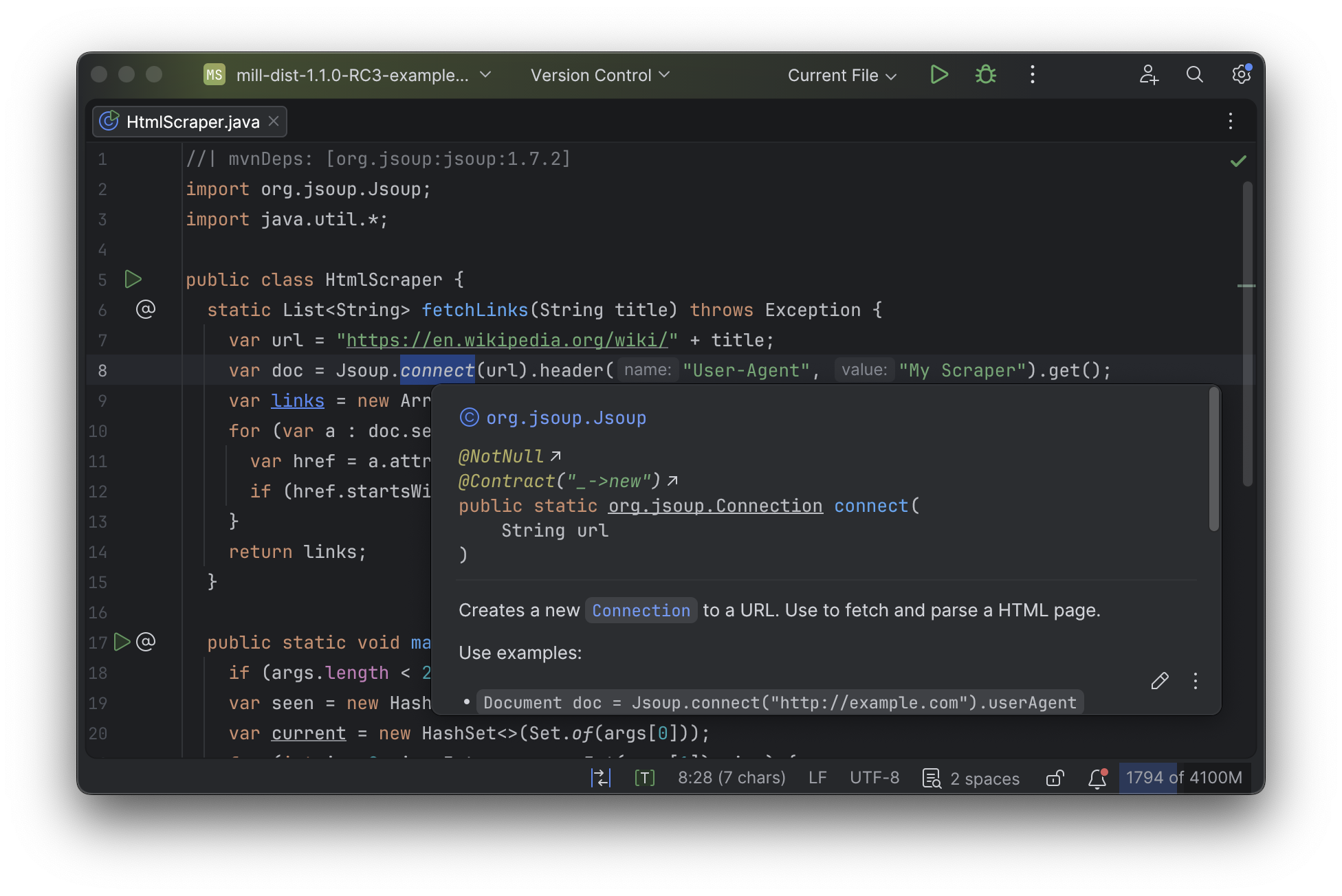
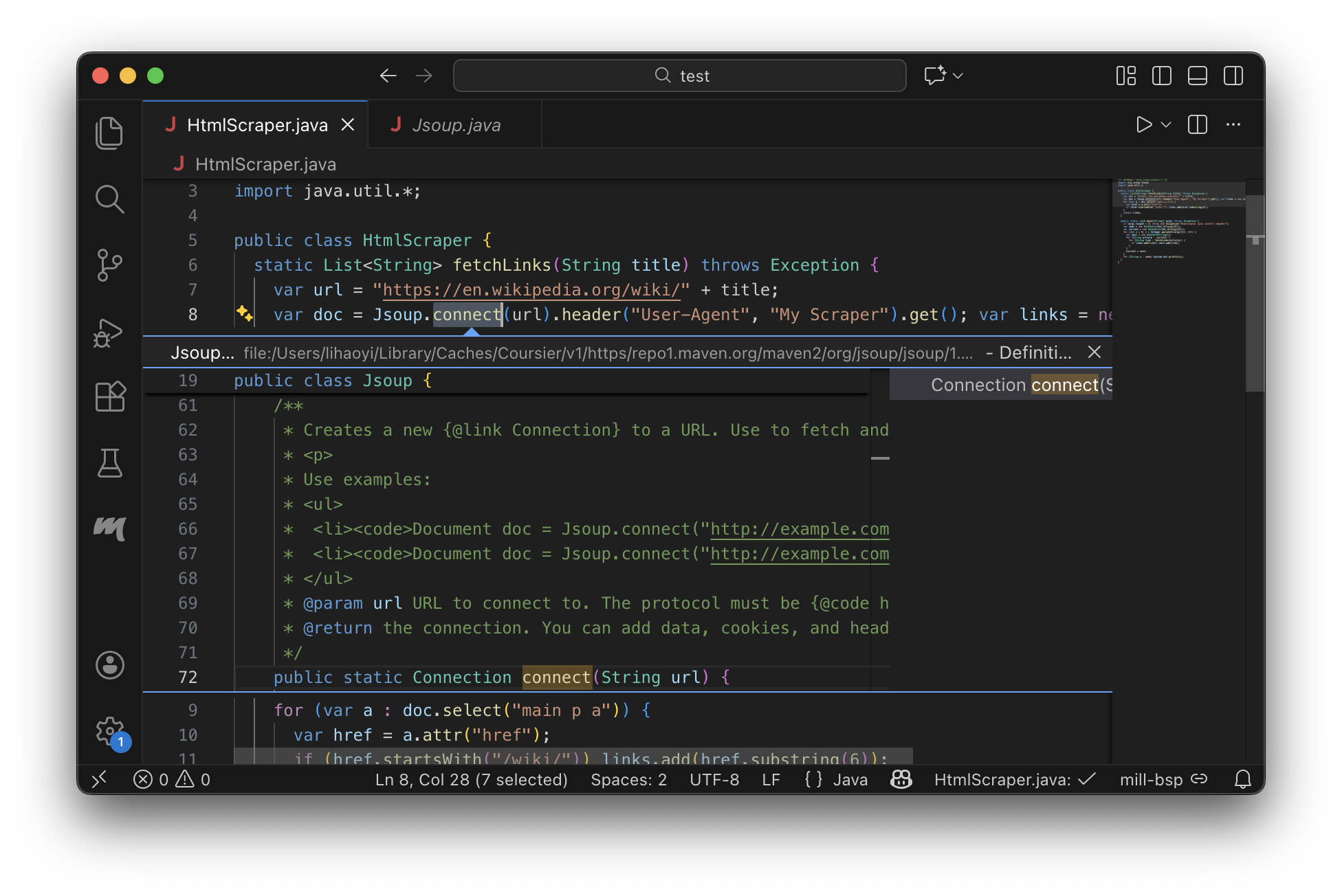
Mill scripts have full support in IDEs like IntelliJ or VSCode (or forks like Cursor or Windsurf)
Mill Script IntelliJ Support
Mill Script VSCode Support
Using Java, Scala or Kotlin to write small scripts isn’t a new idea. The ability to run
java Foo.java from the command line was introduced in Java 11, and tools like JBang providing
a more feature-rich experience. But Mill takes the idea several step further in polish and
robustness, hopefully to a level where scripting on the JVM can be a truly viable workflow
rather than just a tech demo.
Multi-Language JVM Scripting
Like the rest of Mill, single-file scripts support the three major JVM languages. For example,
if you think the HtmlScraper.java is too verbose, you may want to
write your HtmlScraper in Kotlin instead:
HtmlScraper.kt//| mvnDeps:
//| - org.jsoup:jsoup:1.7.2
import org.jsoup.Jsoup
fun fetchLinks(title: String): List<String> {
val url = "https://en.wikipedia.org/wiki/$title"
val doc = Jsoup.connect(url).header("User-Agent", "My Scraper").get()
return doc.select("main p a")
.mapNotNull { a ->
val href = a.attr("href")
if (href.startsWith("/wiki/")) href.removePrefix("/wiki/")
else null
}
}
fun main(args: Array<String>) {
if (args.size < 2) throw Exception("HtmlScraper.kt <start> <depth>")
var seen = mutableSetOf(args[0])
var current = mutableSetOf(args[0])
repeat(args[1].toInt()) {
val next = mutableSetOf<String>()
for (article in current) {
for (link in fetchLinks(article)) {
if (seen.add(link)) next.add(link)
}
}
current = next
}
seen.forEach { println(it) }
}> ./mill HtmlScraper.kt singapore 1
Hokkien
Conscription_in_Singapore
Malaysia_Agreement
Government_of_Singapore
...Or you may want to write your HtmlScraper in Scala, which feels similar to scripting in Ruby, Python, or Javascript, but with the performance, parallelizability and type-safety of a JVM language:
HtmlScraper.scala//| mvnDeps:
//| - org.jsoup:jsoup:1.7.2
import org.jsoup.*
import scala.collection.JavaConverters.*
def fetchLinks(title: String): Seq[String] = {
Jsoup.connect(s"https://en.wikipedia.org/wiki/$title")
.header("User-Agent", "My Scraper")
.get().select("main p a").asScala.toSeq.map(_.attr("href"))
.collect { case s"/wiki/$rest" => rest }
}
def main(startArticle: String, depth: Int) = {
var seen = Set(startArticle)
var current = Set(startArticle)
for (i <- Range(0, depth)) {
current = current.flatMap(fetchLinks(_)).filter(!seen.contains(_))
seen = seen ++ current
}
pprint.log(seen, height = Int.MaxValue)
}> ./mill HtmlScraper.scala --start-article singapore --depth 1
"Hokkien",
"Conscription_in_Singapore",
"Malaysia_Agreement",
"Government_of_Singapore",
...Java is not the only JVM language, and languages like Kotlin or Scala complement it offering a somewhat different experience. So even if scripting in Java may not suit you, scripting in Kotlin or Scala are definitely options you can consider while still benefiting from the robust runtime and rich ecosystem of the JVM.
Conclusion
While developers may differ in what their preferred JVM language is, we think that all three major JVM languages are criminally under-utilized when it comes to writing scripts and small programs. Java, Scala, and Kotlin are all great languages, with high-quality standard libraries, rich ecosystems of third-party libraries, and a rock-solid JVM runtime. However, due to tooling complexity, JVM languages have never been the preferred choice for small programs the same way they are often used for large enterprise codebases.
With the new declarative and single-file configuration styles in Mill 1.1.0, we hope to be
able to change that. Mill’s new declarative build.mill.yaml files take the best parts
of declarative builds from Maven, but streamlines installation, configuration, and command-line
usage. Mill’s single-file scripts take that a step further allowing any .java, .scala, or
.kt file to be annotated and run without needing to set up a separate "project"
or "build file".
Lastly, rather than having to juggle a zoo of different tools for different purposes - JEnv, SdkMan, Maven, Gradle, JBang - Mill provides everything you need in one zero-setup bootstrap script. This makes it trivial to for anyone using any JVM language to run your code conveniently and consistently.
If you have made it this far, we hope that some of the problems and challenges we have discussed in this article resonate with your own personal experience. If you are interested in trying out Mill’s new declarative configuration syntax or single-file scripts, please check out the documentation linked below for each JVM language:
For anyone upgrading from an earlier version of Mill, please see the changelog with a more thorough listing of improvements and migration instructions: