Mill Build Performance
Build tool performance has been a big focus in developing Mill: Java build tools have a reputation for being sluggish, even though the JVM has outstanding performance second only to languages like C/C++/Rust, and the Java compiler is extremely fast. Mill is able to trim a lot of the overhead that other build tools like Maven or Gradle impose, resulting in edit-compile-test workflows that are 3-7x faster than those of other Java build tools.
To get a feel for this difference, play recording below to see Mill (Left) and Maven (Right) running side by side compiling the Netty codebase.
Apart from the raw performance, Mill also has a lot of useful performance-related features that you can use to help speed up your local development and CI workflows to keep your development efforts productive. This article contains a discussion of these performance differences, how the benchmarks were run, and how you can try them out yourselves.
Mill vs Maven
To compare Mill vs Maven, we took the Netty project and ported its Maven build to Mill as a proof of concept, complete enough that we could get all tests passing on a M1 Macbook Pro. Netty is not a small project: ~500,000 lines of code, ~50 submodules, and build customizations such as compiling C code, running Groovy code generators, and other things. After porting all of that from Maven to Mill, we then ran the same common workflows on both equivalent builds to compare the performance: compiling everything, compiling a single module, etc.
Overall across our benchmarks, Mill is 4-7x faster than Maven for clean compiles, both parallel and sequential, and for many modules or for a single module:
Benchmark |
Maven |
Mill |
Speedup |
Sequential Clean Compile All |
98.78s |
24.43s |
4.0x |
Parallel Clean Compile All |
50.67s |
10.35s |
4.9x |
Clean Compile Single Module |
6.33s |
0.90s |
7.0x |
Incremental Compile Single Module |
6.76s |
0.22s |
30.7x |
No-Op Compile Single Module |
5.28s |
0.12s |
44.0x |
First, let’s look at Parallel Clean Compile All.
This benchmark involves running clean to delete all generated files and re-compiling
everything in parallel. Mill sees a significant ~5x speedup over Maven for this benchmark.
The same number of Java files are compiled, with the same classpath, in the same module
layout, with the same Java compiler: the only difference is the reduction in build tool
overhead giving the 5x speedup.
The second benchmark worth noting is Incremental Compile Single Module.
This benchmark involves adding a single newline to the end of a single already-compiled file in common,
and re-compiling common and common.test.
Mill sees a huge speedup for this benchmark, because Mill’s incremental compiler
(Zinc) is able to detect that only one file in one module
has changed, and that the change is small enough
to not require other files to re-compile. In contrast, Maven re-compiles all files in both
modules, even though only one file was touched and the change was trivial.
Looking at these numbers, it is not surprising that the Java platform has a reputation for being slow and clunky. Even in the No-Op Compile Single Module case, it takes ~5 seconds for Maven to realize there’s nothing to do!
However, with Mill it looks very different:
-
Even compiling the entire 500,000 line codebase takes only ~10 seconds
-
Compiling a single module like
netty-commontakes about 1 second -
Incremental compiles after adding a
printlntake a fraction of a second.
If Java developers had this kind of fast turnaround working on their code, no doubt Java would have a very different reputation than it has today.
For more details on these benchmarks, including steps to reproduce them, see Mill vs Maven In Depth
Mill vs Gradle
We used the Mockito codebase as the case study of Mill vs Gradle. Again, we ported it from Gradle to Mill and got all code compiling and all tests passing. Then we ran benchmarks of common workflows comparing the time taken for both Mill and Gradle to do the same work.
Benchmark |
Gradle |
Mill |
Speedup |
Sequential Clean Compile All |
18.3s |
5.0s |
3.7x |
Parallel Clean Compile All |
14.8s |
3.87s |
3.6x |
Clean Compile Single Module |
4.65s |
0.89s |
5.2x |
Incremental Compile Single Module |
1.61s |
0.28s |
5.9x |
No-Op Compile Single Module |
1.02s |
0.10s |
10.2x |
Mill’s various "clean compile" workflows 3-5x faster than Gradle’s, while it’s incremental and no-op compile workflows are 7-9x faster. Both Gradle and Mill appear to do a good job limiting the compilation to only the changed file, but Mill has less fixed overhead than Gradle does, finishing in about ~0.2s rather than ~1.5 seconds.
In general, these benchmarks don’t show Mill doing anything that Maven or Gradle do not: these are equivalent builds for the same projects (Netty and Mockito respectively), compiling the same number of files using the same Java compiler, in the same module structure and passing the same suite of tests. Rather, what we are seeing is Mill simply having less build-tool overhead than Maven or Gradle, so the performance of the underlying JVM and Java compiler (which is actually pretty fast!) can really shine through.
For more details on these Gradle benchmarks, with steps to reproduce them, see Mill vs Gradle In Depth
Not Just Compile Times
Compilation times are only one part of the time taken during development. Mill also provides features that help speed up other parts of your development cycle:
-
Selective Test Execution allows you to skip unrelated tests when validating pull requests, speeding up PR validation considerably
-
Test Parallelism automatically distributes tests across multiple threads, utilizing all available cores while maintaining long-lived JVM processes to maximize performance
-
Incremental Assembly Jar Creation speeds up creation of assembly jars, greatly speeding up workflows that use them (e.g. Spark Submit)
-
Build Performance Profiles are automatically generated for every command, giving visibility into where the build tool is spending time so you can understand and optimize it.
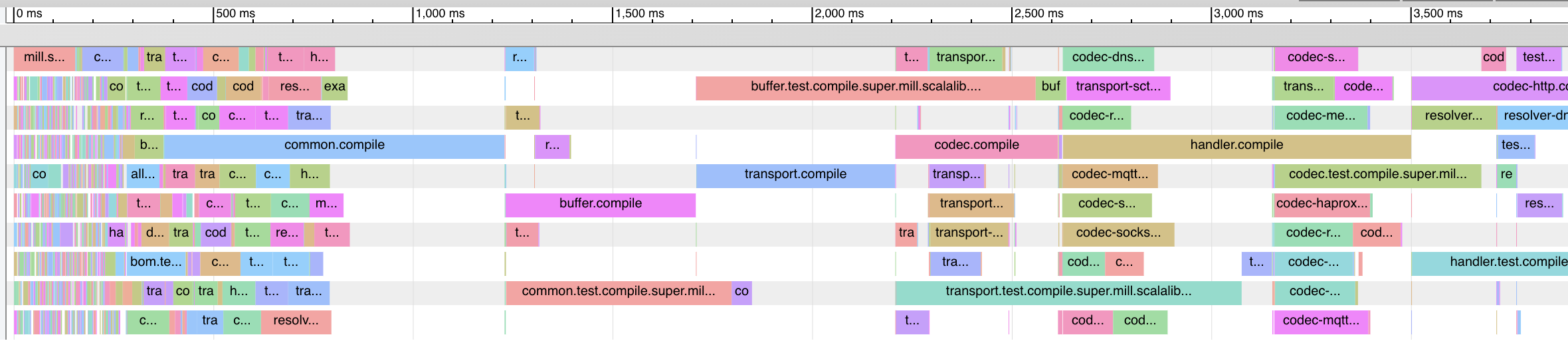
None of these features are rocket science, and they are all things that you can in theory set up with other build tools. However, Mill provides these features built-in without needing to first hunt down plugins or third-party integrations, and makes all of them easy to set up and use.
Benchmarks in Depth
The following sections will go deeper into the benchmarks, exploring the root cause of the performance differences and what commands were used for each benchmark.
The benchmarks on these page were run on with Mill 1.1.0 on a 10CPU/32GB 2021 M1 Macbook Pro, with whatever version of Maven or Gradle each respective project defaults to. Each command was run manually 5 times to allow warmup then the last 3 times recorded. The Netty and Mockito codebases used in the benchmark are available for download below, along with their example Mill configuration, so you can try running the benchmark commands yourself.
Note that as Mill runs a JVM background daemon, it may require a few runs for the JVM to warm up to peak performance, and do be aware that benchmarked performance is expected to differ on different operating systems and hardware.
Mill vs Maven In Depth
This section goes into the weeds comparing the Mill and Maven build tool performance.
To do this, we have written a Mill build.mill file for the Netty project. This can be used
with Mill to build and test the various submodules of the Netty project without needing to
change any other files in the repository:
To reproduce these benchmarks locally, you can download and unzip
The Mill build for Netty is not 100% complete, but it covers most of the major parts of Netty: compiling Java, compiling and linking C code via JNI, custom codegen using Groovy scripts, running JUnit tests and some integration tests using H2Spec. All 47 Maven subprojects are modelled using Mill, with the entire Netty codebase being approximately 500,000 lines of code.
$ git ls-files | grep \\.java | xargs wc -l
...
513805 total
The goal of this exercise is not to be 100% feature complete enough to replace the Maven build today. It is instead meant to provide a realistic comparison of how using Mill in a large, complex project compares to using Maven.
Both Mill and Maven builds end up compiling the same set of files, although the number being
reported by the command line is slightly higher for Mill (2915 files) than Maven (2822) due
to minor differences in the reporting (e.g. Maven does not report package-info.java files
as part of the compiled file count).
The Mill build for Netty is much more performant than the default Maven build. This applies to most workflows.
For the benchmarks below, each provided number is the wall time of three consecutive runs
on my M1 Macbook Pro using Java 17 and Mill 0.12.9-native. While ad-hoc, these benchmarks
are enough to give you a flavor of how Mill’s performance compares to Maven:
Benchmark |
Maven |
Mill |
Speedup |
Sequential Clean Compile All |
98.78s |
24.43s |
4.0x |
Parallel Clean Compile All |
50.67s |
10.35s |
4.9x |
Clean Compile Single Module |
6.33s |
0.90s |
7.0x |
Incremental Compile Single Module |
6.76s |
0.22s |
30.7x |
No-Op Compile Single Module |
5.28s |
0.12s |
44.0x |
The column on the right shows the speedups of how much faster Mill is compared to the equivalent Maven workflow. In most cases, Mill is 4-7x faster than Maven. Below, we will go into more detail of each benchmark: how they were run, what they mean, and how we can explain the difference in performing the same task with the two different build tools.
Sequential Clean Compile All
$ ./mvnw clean; time ./mvnw -Pfast -Denforcer.skip=true install
97.20s
98.35s
100.8s

$ ./mill clean _; time ./mill -j1 __.compile
25.65s
23.63s
24.02s
This benchmark exercises the simple "build everything from scratch" workflow, with all remote
artifacts already in the local cache. The actual files being compiled are the same in either.
I have explicitly disabled the various linters and tests for the Maven build, to just focus
on the compilation of Java source code making it an apples-to-apples comparison. As Mill
runs tasks in parallel by default, I have disabled parallelism explicitly via -j1
As a point of reference, Java typically compiles at 10,000-50,000 lines per second on a single thread, and the Netty codebase is ~500,000 lines of code, so we would expect compile to take 10-50 seconds without parallelism. The 20-30s taken by Mill seems about what you would expect for a codebase of this size, and the ~100s taken by Maven is far beyond what you would expect from simple Java compilation.
From this benchmark, we can see that although both Mill and Maven are doing the same work,
Mill takes about as long as it should for this task of compiling 500,000 lines of Java source
code, while Maven takes considerably longer. This difference is purely build tool overhead
in Maven - in the install workflow, in the JVM process warmup, etc. - that Mill manages
to avoid.
./mill clean _
The first thing to take note is that we use ./mill clean with an underscore
rather than ./mill clean for this benchmark. The difference is that ./mill clean _
cleans the output of all user-defined modules or tasks, while ./mill clean also
wipes out Mill’s internal workers and machinery.
From a user perspective, ./mill clean _ more accurately reflects what you are likely to
see when working with your project, e.g. after performing a large refactor or git branch update
that forces everything to re-compile, so that is what we use in this benchmark
Maven Compile vs Install
The second thing you may notice is the use of ./mvnw install rather than ./mvnw compile.
The reason for this is that Maven’s main mechanism for managing inter-module dependencies
is via the local artifact cache at ~/.m2/repository. Although many workflows work with
compile, some don’t. In particular, ./mvnw clean compile on the Netty codebase fails with:
[ERROR] Failed to execute goal org.apache.maven.plugins:maven-dependency-plugin:2.10:unpack-dependencies
(unpack) on project netty-resolver-dns-native-macos: Artifact has not been packaged yet.
When used on reactor artifact, unpack should be executed after packaging: see MDEP-98. -> [Help 1]
[ERROR]
[ERROR] To see the full stack trace of the errors, re-run Maven with the -e switch.
[ERROR] Re-run Maven using the -X switch to enable full debug logging.
[ERROR]
[ERROR] For more information about the errors and possible solutions, please read the following articles:
[ERROR] [Help 1] http://cwiki.apache.org/confluence/display/MAVEN/MojoExecutionException
[ERROR]
[ERROR] After correcting the problems, you can resume the build with the command
[ERROR]   mvn <args> -rf :netty-resolver-dns-native-macos
In contrast, Mill builds do not rely on the local artifact cache, even though Mill is able
to publish to it. That means Mill builds are able to work directly with classfiles on disk,
simply referencing them and using them as-is without spending time packing and unpacking them
into .jar files. But even if we did want Mill to generate the .jars, the
overhead of doing so is just a few seconds, far less than the minutes that
Maven’s overhead adds to the clean build:
$ ./mill clean _; time ./mill -j1 __.jar
27.92s
27.85s
29.01s
Parallel Clean Compile All
$ ./mvnw clean; time ./mvnw -T 10 -Pfast -Denforcer.skip=true install
51.48s
49.17s
51.36s

$ ./mill clean _; time ./mill __.compile
10.73s
10.05s
10.27s
This example compares Maven v.s. Mill, when performing the clean build on 10 threads.
Both build tools support parallelism (-T 10 in Maven, by default in Mill), and both
tools see a similar ~2x speedup for building the Netty project using 4 threads.Again,
this tests a clean build using ./mvnw clean or ./mill clean.
This comparison shows that much of Mill’s speedup over Maven is unrelated to parallelism. Whether sequential or parallel, Mill has approximately the same 4-5x speedup over Maven when performing a clean build of the Netty repository.
Clean Compile Single-Module
$ ./mvnw clean; time ./mvnw -pl common -Pfast -Denforcer.skip=true -Dmaven.test.skip=true install
6.38s
6.46s
6.17s

$ ./mill clean common; time ./mill common.compile
0.89s
0.91s
0.90s
This exercise limits the comparison to compiling a single module, in this case common/,
ignoring test sources.
Again, we can see a significant speedup of Mill v.s. Maven remains even when compiling a
single module: a clean compile of common/ is about 6x faster with Mill than with Maven!
Again, common/ is about 30,000 lines of Java source code, so at 10,000-50,000 lines per
second we would expect it to compile in about 1-4s. That puts Mill’s compile times right
at what you would expect, whereas Maven’s has a significant overhead.
Incremental Compile Single-Module
$ echo "" >> common/src/main/java/io/netty/util/AbstractConstant.java
$ time ./mvnw -pl common -Pfast -DskipTests  -Dcheckstyle.skip -Denforcer.skip=true install
Compiling 174 source files to /Users/lihaoyi/Github/netty/common/target/classes
Compiling 60 source files to /Users/lihaoyi/Github/netty/common/target/test-classes

7.75s
6.33s
6.22s


$ echo "" >> common/src/main/java/io/netty/util/AbstractConstant.java
$ time ./mill common.test.compile
compiling 1 Java source to /Users/lihaoyi/Github/netty/out/common/compile.dest/classes ...

0.22s
0.23s
0.21s
This benchmark explores editing a single file and re-compiling common/.
Maven by default takes about as long to re-compile common/s main/ and test/ sources
after a single-line edit as it does from scratch, about 20 seconds. However, Mill
takes just about 0.5s to compile and be done! Looking at the logs, we can see it is
because Mill only compiles the single file we changed, and not the others.
For this incremental compilation, Mill uses the Zinc Incremental Compiler. Zinc is able to analyze the dependencies between files to figure out what needs to re-compile: for an internal change that doesn’t affect downstream compilation (e.g. changing a string literal) Zinc only needs to compile the file that changed, taking barely half a second:
$ git diff
diff --git a/common/src/main/java/io/netty/util/AbstractConstant.java b/common/src/main/java/io/netty/util/AbstractConstant.java
@@ -83,7 +83,7 @@ public abstract class AbstractConstant<T extends AbstractConstant<T>> implements
             return 1;
         }

-        throw new Error("failed to compare two different constants");
+        throw new Error("failed to compare two different CONSTANTS!!");
     }

 }
$ time ./mill common.test.compile
[info] compiling 1 Java source to /Users/lihaoyi/Github/netty/out/common/compile.dest/classes ...
0m 00.55s6In contrast, a change to a class or function public signature (e.g. adding a method) may require downstream code to re-compile, and we can see that below:
$ git diff
diff --git a/common/src/main/java/io/netty/util/AbstractConstant.java b/common/src/main/java/io/netty/util/AbstractConstant.java
@@ -41,6 +41,10 @@ public abstract class AbstractConstant<T extends AbstractConstant<T>> implements
         return name;
     }

+    public final String name2() {
+        return name;
+    }
+
     @Override
     public final int id() {
         return id;
$ time ./mill common.test.compile
[25/48] common.compile
[info] compiling 1 Java source to /Users/lihaoyi/Github/netty/out/common/compile.dest/classes ...
[info] compiling 2 Java sources to /Users/lihaoyi/Github/netty/out/common/compile.dest/classes ...
[info] compiling 4 Java sources to /Users/lihaoyi/Github/netty/out/common/compile.dest/classes ...
[info] compiling 3 Java sources to /Users/lihaoyi/Github/netty/out/common/test/compile.super/mill/scalalib/JavaModule/compile.dest/classes ...
[info] compiling 1 Java source to /Users/lihaoyi/Github/netty/out/common/test/compile.super/mill/scalalib/JavaModule/compile.dest/classes ...
0m 00.81s2Here, we can see that Zinc ended up re-compiling 7 files in common/src/main/ and 3 files
in common/src/test/ as a result of adding a method to AbstractConstant.java.
In general, Zinc is conservative, and does not always end up selecting the minimal set of
files that need re-compiling: e.g. in the above example, the new method name2 does not
interfere with any existing method, and the ~9 downstream files did not actually need to
be re-compiled! However, even conservatively re-compiling 9 files is much faster than
Maven blindly re-compiling all 234 files, and as a result the iteration loop of
editing-compiling-testing your Java projects in Mill can be much faster than doing
the same thing in Maven
No-Op Compile Single-Module
$ time ./mvnw -pl common -Pfast -Denforcer.skip=true install
6.31s
4.76s
4.77s

$ time ./mill common.test.compile
0.12s
0.11s
0.12s
This last benchmark explores the boundaries of Maven and Mill: what happens if we ask to compile a single module that has already been compiled? In this case, there is literally nothing to do. For Maven, "doing nothing" takes ~17 seconds, whereas for Mill we can see it complete and return in less than 0.5 seconds
Grepping the logs, we can confirm that both build tools skip re-compilation of the
common/ source code. In Maven, skipping compilation only saves us ~2 seconds,
bringing down the 19s we saw in Clean Compile Single-Module to 17s here. This
matches what we expect about Java compilation speed, with the 2s savings on
40,000 lines of code telling us Java compiles at ~20,000 lines per second. However,
we still see Maven taking 17 entire seconds before it can decide to do nothing!
In contrast, doing the same no-op compile using Mill, we see the timing from 2.2s in Clean Compile Single-Module to 0.5 seconds here. This is the same ~2s reduction we saw with Maven, but due to Mill’s minimal overhead, in the end the command finishes in less than half a second.
Mill vs Gradle In Depth
This section compares using Mill to Gradle using the Mockito Testing Library codebase as the example. Mockito is a medium sized codebase, 100,000 lines of Java split over 22 subprojects. By porting it to Mill, this case study should give you an idea of how Mill compares to Gradle in more realistic, real-world projects.
To do this, we have written a Mill build.mill file for the Mockito project. This can be used
with Mill to build and test the various submodules of the Mockito project without needing to
change any other files in the repository:
To reproduce these benchmarks locally, you can download and unzip
And run the commands listed in the below sections yourself. Note that as Mill runs a JVM background daemon, it may require a few runs for the JVM to warm up to peak performance, and do be aware that benchmarked performance is expected to differ on different operating systems and hardware
The Mill build for Mockito is not 100% complete, but it covers most of the major parts of Mockito: compiling Java, running JUnit tests. For now, the Android, Kotlin, and OSGI tests are skipped, as support for Building Android apps in Mill and Kotlin with Mill is still experimental.
The goal of this exercise is not to be 100% feature complete enough to replace the Gradle build today. It is instead meant to provide a realistic comparison of how using Mill in a realistic, real-world project compares to using Gradle.
The Mill build for Mockito is generally snappier than the Gradle build. This applies to most workflows, but the difference matters most for workflows which are short-lived, where the difference in the fixed overhead of the build tool is most noticeable.
For comparison purposes, I disabled the Gradle subprojects that we did not fully implement in Mill
(groovyTest, groovyInlineTest, kotlinTest, kotlinReleaseCoroutinesTest, android,
osgi-test, java21-test), and added the necessary flags to ensure caching/parallelism/etc. is
configured similarly for both tools. This ensures the comparison is fair with both builds compiling the
same code and running the same tests in the same way.
For the benchmarks below, each provided number is the median wall time of three consecutive runs
on my M1 Macbook Pro with Java 17 and Mill 0.12.9-native. While ad-hoc, these benchmarks are
enough to give you a flavor of how Mill’s performance compares to Gradle:
Benchmark |
Gradle |
Mill |
Speedup |
Sequential Clean Compile All |
18.3s |
5.0s |
3.7x |
Parallel Clean Compile All |
14.8s |
3.87s |
3.6x |
Clean Compile Single Module |
4.65s |
0.89s |
5.2x |
Incremental Compile Single Module |
1.61s |
0.28s |
5.9x |
No-Op Compile Single Module |
1.02s |
0.10s |
10.2x |
The column on the right shows the speedups of how much faster Mill is compared to the equivalent Gradle workflow. In most cases, Mill is 2-4x faster than Gradle. Below, we will go into more detail of each benchmark: how they were run, what they mean, and how we can explain the difference in performing the same task with the two different build tools.
Sequential Clean Compile All
$ # edit gradle.properties to set org.gradle.parallel=false
$ ./gradlew clean; time ./gradlew classes testClasses --no-build-cache
18.28s
18.26s
18.28s

$ ./mill clean _; time ./mill -j1 __.compile
4.98s
4.96s
5.06s
This benchmark measures the time taken to sequentially compiled all the Java code in the Mockito code base. The goal of this benchmark is to try and measure the "clean compile everything" step, without the effects of parallelism that can be nondeterministic and vary wildly from machine to machine depending on the number of cores available.
To limit our comparison to compiling Java code only, we avoid
using build in favor of classes and testClasses: this skips running tests,
lint, jar/docjar generation, and other steps that build performs to make it an apples-to-apples
comparison. Furthermore, Gradle parallelizes the build by default and caches things globally
under ~/.gradle/caches, while Mill parallelizes by default but does not cache things globally.
Again to make it a fair comparison, we use --no-build-cache in Gradle and set
org.gradle.parallel=false in gradle.properties, and pass -j1 to limit Mill to a
single thread.
Here we see Mill being about ~3.3x faster than Gradle, to do the equivalent amount of work. As a point of reference, Java typically compiles at 10,000-50,000 lines per second on a single thread, and the Mockito codebase is ~100,000 lines of code, so we would expect compile to take 2-10 seconds without parallelism. The 5-6s taken by Mill seems about what you would expect for a codebase of this size, and the ~17s taken by Gradle is much more than what you would expect from simple Java compilation.
It’s actually not clear to me where the difference in execution time is coming from. Unlike the Mill v.s. Maven comparison, Gradle’s command line output doesn’t show any obvious network requests or jar packing/unpacking/comparing going on. But Gradle’s CLI output is also much less verbose than Maven’s, so it’s possible things are going on under the hood that I’m not aware of.
Parallel Clean Compile All
$ # edit gradle.properties to set org.gradle.parallel=true
$ ./gradlew clean; time ./gradlew classes testClasses --no-build-cache
14.1s
15.6s
14.8s

$ ./mill clean _; time ./mill __.compile
3.74s
4.16s
3.73s
This benchmark is identical to the Sequential Clean Compile All benchmark above, but enables
parallelism: Gradle by default, Mill without -j1 to run on 10 cores (the number on my Macbook Pro).
Neither Gradle nor Mill benefit hugely from parallelism: both show a moderate ~50% speedup, despite receiving 900% more CPUs. This likely indicates that the module dependency graph of the Mockito codebase is laid out in a way that does not allow huge amounts of compile-time parallelism.
Again, we see Mill being about ~3.4x faster than Gradle, to do the equivalent amount of work. This indicates the speedup Mill provides over Gradle is unrelated to the parallelism of each tool.
Clean Compile Single-Module
$ ./gradlew clean; time ./gradlew :classes --no-build-cache
4.55s
4.82s
4.60s

$ ./mill clean _; time ./mill compile
0.84s
0.81s
1.03s
This benchmark indicates the use case of clean-compiling a single module. In this case,
the root module in src/main/java/ containing the bulk of the Mockito library code,
excluding the test code in src/test/java/ and all the downstream subprojects in
subprojects/.
This benchmark gives us Mill being about ~3.7x faster than Gradle. This is in line with the results above.
Incremental Compile Single-Module
$ echo "" >> src/main/java/org/mockito/BDDMockito.java; time ./gradlew :classes
1.67s
1.64s
1.52s

$ echo "" >> src/main/java/org/mockito/BDDMockito.java; time ./mill compile
compiling 1 Java source to /Users/lihaoyi/Github/netty/out/common/compile.dest/classes ...
0.27s
0.26s
0.33s
This benchmark measures the common case of making a tiny change to a single file and
re-compiling just that module. This is the common workflow that most software developers
do over and over day-in and day-out. We simulate this by appending a new line to the
file src/main/java/org/mockito/BDDMockito.java.
Both Mill and Gradle are able to take advantage of the small code change and re-compile only the single files needing re-compilation, demonstrating substantial speedups over the Clean Compile Single-Module benchmark above. Mill remains faster than Gradle, showing a ~2.7x speedup for this task
No-Op Compile Single-Module
$ time ./gradlew :classes
1.01s
1.05s
1.00s

$ time ./mill compile
0.11s
0.09s
0.10s
This benchmark is meant to measure the pure overhead of running the build tool: given a single module that did not change, the build tool should need to do nothing in response, and so any time taken is pure overhead.
For both Mill and Gradle, we see small speedups relative to the Incremental Compile Single-Module benchmark above, which likely comes from not having to compile any Java source files at all. Mill remains faster than Gradle by about 2.0x.
Conclusion
The Mill, Gradle, and Maven builds we discussed in this case study do the same thing: they compile Java code and run tests. Sometimes they perform additional configuration, tweaking JVM arguments or doing ad-hoc classpath mangling. While the Mill builds are not 100% feature complete - e.g. the Mill build for Netty doesn’t support building on a half-dozen different operating systems like the Maven build does - they are complete enough to pass all tests and be a realistic comparison.
But the bottom line is that, building projects with Mill is significantly faster than Maven or Gradle. Things like 3-6x faster compiles, selective test execution, incremental assembly jars, automatic build profiling all add up to make Mill a substantially snappier build tool than what you might be used to. If you’ve ever been frustrated by slowness in your JVM development process, you should try Mill to see if it can give you a very different experience!